
Skill Development
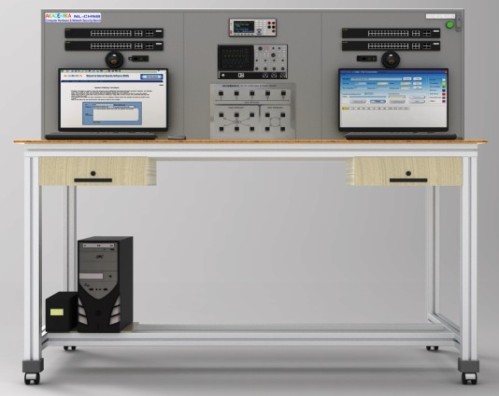
NL-NST: Computer Networks and Cyber Security WorkBench
About Product
A modular, fully equipped training workbench combining server-based networking, routing & switching, wireless LAN setup, and cybersecurity practice. It includes DHCP/FTP/DNS configuration, VLAN and CLI training, protocol analysis, and protection mechanisms—providing a complete solution to teach network infrastructure and internet security skills in one integrated system.
Modular Workbench
Compute Server for DHCP, FTP and DNS
Router & Layer 2 Switch
Wireless Access Point
LAN Training System with Protocol Analyser and Simulation Software
Network and Internet Security Training Software
LAN Tool Kit
STAR, BUS and RING Topology
Network Protection and Troubleshooting
CLI and Web Managed Configuration of a Switch & Router
Configuring a WAP and Wireless LAN
VLAN Set-up
Protocols selection
i) Stop and Wait
ii) Go back to n
iii) Selective repeat
iv) Sliding window
v) Token ring
vi) Token Bus
vii) CSMA / CD
viii) CSMA / CA
Workbench:
The Training System and Network Devices are aesthetically embedded on the Network Rack and Workbench. It has a power indicator & ON/OFF Control and Circuit Breaker of rating 3Amp with ON/OFF Control along with over load protection. Access door provided for equipment removal and maintenance.
The Workbench is supplied with a 1KVA UPS/Inverter to cater for all equipment on board the workbench.
Computer Server - 1 No
Serverprovides is designed to run on-premises and hybrid cloud solutions, deliveringenterprise-class performance, security, reliability, and expandability
Processor: Intel Xeon E-2224 (4-Core, 3.4 GHz, 71W)
Number of Processors: One
Memory: 8 GB UDIMM DDR4 (1x 8 GB) or better
Network Controller Embedded: 1GB 2-Port 361i Ethernet Adapter
Storage Controller Embedded: S100: SW RAID with 4 SATA ports
Internal Storage: 4 LFF HDD Bays — 1TB SATA
PCI-Express Slots: 1 PCle 3.0 slots
Power Supply (1) External Power Supply
Industry Standard Compliance:
AdvancedEncryption Standard (AES),
Active Directory v1.0WindowsServer Essential- 25 User License
Monitor, Keyboard, Mouse supplied with the Server.
Client Workstation — 3 Nos (OPTIONAL)
Router - 1 NoAggregate Throughput: 35 Mbps or better
Total onboard WAN or LAN 10/100/1000 ports: 2 Nos
RJ-45-based ports: 2 Nos
Default memory double-data-rate 3 (DDR3) error -
Correction-code (ECC) DRAM: 4 GB
Default flash memory 8 GB
Serial console port - RJ45 (up to 115.2 kbps): 1
Protocols: IPv4, IPv6, static routes, Routing Information
Protocol Versions 1 and 2 (RIP and RIPv2), Open Shortest
Path First (OSPF), Enhanced Interior Gateway Routing
Protocol (EIGRP), Border Gateway Protocol (BGP), BGP
Router Reflector, Intermediate System-to Intermediate
System (IS-IS), Multicast Internet Group
Management Protocol Version 3 (IGMPv3), Protocol
Independent
Multicast sparse mode (PIM SM), PIM Source-Specific
Multicast (SSM), Resource Reservation Protocol (RSVP) etc
Managed Layers 2 SWITCH - 2 No.
Processor and Memory:
Processor: 800 MHz, 512 MB SDRAM, 256 MB flash; packet
Buffer: 1.5 MB
IEEE 802.1Q VLAN support
Support for up to 256 VLANs with a VLAN ID range of 2-4093
IEEE 802.1X access control
Authentication of network users on a per port basis prior to permitting network access.
Port authentication includes assigned VLAN, Spanning Tree
Protocol (STP)
Supports standard IEEE 802.1D STP, IEEE 802.1w Rapid Spanning Tree Protocol (RSTP) for faster convergence, and IEEE 802.1s Multiple Spanning Tree Protocol (MSTP on local web).
IGMP snooping v1/v2
Improves network performance through multicast filtering, instead of flooding traffic onall ports.
Address Resolution Protocol (ARP)
The ARP table displays all of the IP addresses that have been resolved to MAC addresses, either dynamically or through static entry configuration.
Wireless Access Point - 1 No
5GHz 802.1 1ac and 2.4 GHz 802.11n 300 Mbps max rate)
Radios, dual-band antennas, 10/100/1000BASE-T Ethernet network interfaces (RJ-45)- 4 LAN port and 1 WAN Port
Trainer Boards consisting of
LAN Training System - 01Hardware Topology
i) Star
ii) Bus
iii) RingNodes : 4 Nodes
Data Rate : 10/100 Mbps
Interconnection :RJ45 connection cable to connect hardware to computer LAN card
Software Topology selection
i) Star
ii) Bus
iii) RingProtocols selection
(i) Stop and Wait
(ii) Go back to n
(iii) Selective repeat
(iv)Sliding window
(v) Token Ring
(vi) Token Bus
(vii) CSMA/ CD
(viii) CSMA/CAPacket Size: 128, 256, 512, 1024, 2048, 4096, 8192,16384
Inter packet delay: 1000, 2000, 3000, 4000, 5000ms
Error generation: Bad packet, acknowledgment lost and auto error generation
Encryption and decryption of data
Network details: Indication of computer name, IP address, Port number, status of network, MAC address and operating system on computer.
Graphical representation: Graphic representation of Data on software screen with differentiation of packet to be transmitted, packet being transmitted, packet transmitted with acknowledgment, packet with acknowledgment lost error, packet with bad packet error and packet which is discarded or resend.
Measurement and plotting: Error rate calculation, Throughput calculation Protocol analysis: Indication of packet serial number file name, file size, file number, receiver name, workgroup, receiver IP address, current packet, total packets, packet length, delay, protocol, topology, receiver MAC address, port number, packet send time, acknowledgment receive time, inter packet delay, data rate (Mbps), number of resend packets, acknowledgment value.
Network analysis: Indication of packet serial number, file name, file size, file number, receiver name, work group, receiver IP address, total packets, packet length, time out, protocol, topology, receiver MAC address, port number, file send start time, file sent completion time, transmission time, data rate (MBPS),error.
Data Communication Training System
128 X 64 Graphics LCD display.
Memory-Flash 2MX16 Parallel,
Micro SD Card, Ethernet Port: 10/100 Ethernet RMIl
Interface, Interface Port - USB.
On- Board |2C, SPI and CAN Bus.
Facility for programming of Drivers for USB and Ethernet Port in Bare Metal level.
i) Real Time Network Protocol Analyser Software -1 User
The Protocol Analyser Software should be able to Capture live packet data from a network interface.
Facility to Open files containing packet data captured with many other packet capture programs.
Facility to Import packets from text files containing hex dumps of packet data.
Facility to Display packets with very detailed protocol information.
Facility to Save packet data captured.
Facility to Export some or all packets in a number of capture file formats.
Facility to Filter packets before and after capture of data using Capture Filter and Display Filter like Ethernet broadcast, No ARP,|pv4 ,TCP only, UDP only, HTTP, non HTTP etc.
Facility to create various statistics like Captured File
Properties, Protocol Hierarchy, Packet Length,
I/O Graphs etc.
NOTE: Due to constant upgradation in the networking products the specification mentioned are subjectedto change to meet our curriculum needs.
The Computer Network and Internet Security Training System is a modular workbench and supplied as a set with all the following hardware and software components.
The objective of the system is to teach the following curriculum:
a) Data Communication Components: Initialization, Configuration and Data Transfer using Serial, USB, and Ethernet Ports
b) Types of Networks: Network Media—UTP Cables and wiring scheme, Topologies—Star, Bus & Ring Topology,
c) Server: Client and Server Roles, Peer-to-Peer Network, Installing and Configuring Windows Server, Installing and Configuring Active Directory, Implementing AD Services, Configuring a Server as a Web and FTP Server, Mailbox, and DHCP and DNS Services
d) Network Devices: Command Line Interface & Web Managed Configuration of Switch, Configuring a WAP & Wireless LAN, Out-of-Band and In-Band Management.
e) Network Switching and Routing: Study of OSI Layer (Physical, Data Link, Network & Transport Layer), Address Routing Protocol (ARP), IP Addressing technique (IP4/IP6) and Subnetting, Installation and Configuration of TCP/IP Protocol Utilities: PING, IPCONFIG, HOSTNAME, ROUTE, TRACERT, etc. Packet Switching, Setup and Configuration of a Virtual LAN, Spanning Tree Protocol, Command Line Interface and IP Routing, Network Protocols, and Network Simulation Tools.
f) Protocols: i) Stop and Wait ii) Go back to n iii) Selective repeat iv) Sliding window v) Token Ring vi) Token Bus vii) CSMA/CD viii) CSMA/CA, Real Time Protocol Analysis – TCP/IP and UDPCOMPUTER HARDWARE
To study different parts of computer hardware.
To introduce the switch faults in different sections of computer hardware and study their effect.SERVER
Computer server with Windows Server operating system.
Install and configure Windows Server.
Install and configure Active Directory, implementing AD services.
Configuring a Server as a Web and FTP Server.
Configuring a Server as a Mailbox.
Configuring a Server for DHCP.
Installation and Configuring DNS Services.LOCAL AREA NETWORK AND PROTOCOLS
Study of Ethernet LAN and Wireless LAN.
Study of data encryption and decryption
Implementation and study of stop-and-wait protocol
Implementation and study of the go-back-to-n protocol
Implementation and study of selective repeat protocol
Study of token ring and token bus protocol
Study of sliding window protocol
Study of CSMA/CA protocol
Study of CSMA/CD protocol
Measure of throughput and the effect of bit errors on various protocols
Socket programmingNETWORK SWITCHING AND ROUTING
Study of OSI Layer (Physical, Data Link, Network & Transport Layer)
IP Addressing technique (IP4/IP6) and Subnetting
Installation and Configuration of TCP/IP Protocol Utilities: PING, IPCONFIG, HOSTNAME, ROUTE, TRACERT, etc.
Setup and configure a Virtual LAN
Spanning Tree Protocol Command Line Interface and IP Routing process
Windows Networking commands
Basic Concepts of Routing
Remote configuration and management enabling configuration and management through a secure Web browser or a CLI located on a remote device
Command authorization: Leverages HWTACACS to link a custom list of CLI commands to an individual network administrator’s login; also provides an audit trail
Address Resolution Protocol (ARP): Determining the MAC address of another IP host the same subnet; support static ARPs; Gratuitous ARP allows detection of duplicate IP addresses; proxy ARP allows normal ARP operation between subnets or when subnets are separated by a Layer 2 network.
Configure the Switch Management Interface.
Establish an out-of-band connection and an in-band connection.INTERNET SECURITY
Simulation techniques
HTTP technique
Brute force algorithm
View/add/edit/update contents
Login historyFTP technique
Brute force algorithm
Upload/download filesPhishing technique
Compose mail/inbox
Spyware technique
Brute force algorithm
Upload /download spywareVirus technique
Upload/download e-mail virus
With 35 years of legacy in Technical Education, Akademika extends its expertise to Defence and Skill development, building Innovative, Reliable Training Systems for the next generation of Learners.
Partner with Akademika
Join leading institutions that trust our engineering to Advance Learning and Research.