
Technology Labs
WL-WSN: Wireless Sensor and IoT Network Laboratory
About Product
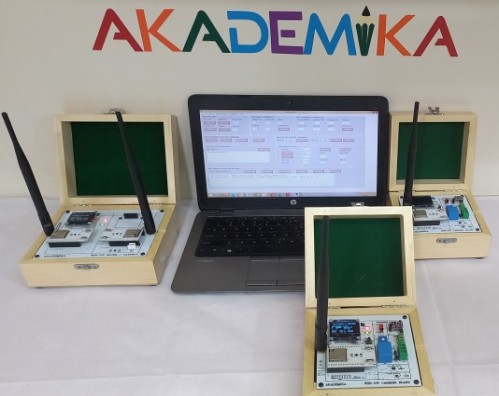
The WL-WSN Trainer is a portable Wireless Sensor Network testbed using ESP32 modules for real-time study of Wi-Fi communication, routing, and sensor-based applications. It supports up to multi-nodes with self-organizing multi-hop networks and requires no frequent reprogramming. A user-friendly GUI enables easy setup, monitoring, and control for practical WSN experiments. The trainer includes support for Wi-Fi-based communication, sensor interfacing, and routing experiments, enabling realistic hands-on WSN learning and application testing.
1) It enables analysis of wireless media propagation, network formation, radio parameter impact, and real-time communication performance.
2) The system provides a hands-on experimental environment bridging simulation and real-world deployment.
3) “The WL-WSN IoT Trainer Kit provides a complete platform for real-time wireless communication analysis, multi-hop networking, and IoT-based monitoring using industry-relevant protocols and tools.”
4) Based on IEEE 802.11 (WSN) with ESP32 Wi-Fi-enabled IoT integration
5) Study wireless communication and network formation
6) Measure RF propagation and reliability
7) Analyze network performance
8) Build applications using on-board sensors
9) The system is powered by the Patented S-WiFi Network Stack, offering hardware-independent architecture, self-organizing network formation, and self-healing communication.
10) Network Architecture: 16-bit addressing scheme
11) Two-tier network: Master Device (MD) and Network Processing Devices (NPD)
12) Each device includes an OLED display for real-time monitoring.
2) The system provides a hands-on experimental environment bridging simulation and real-world deployment.
3) “The WL-WSN IoT Trainer Kit provides a complete platform for real-time wireless communication analysis, multi-hop networking, and IoT-based monitoring using industry-relevant protocols and tools.”
4) Based on IEEE 802.11 (WSN) with ESP32 Wi-Fi-enabled IoT integration
5) Study wireless communication and network formation
6) Measure RF propagation and reliability
7) Analyze network performance
8) Build applications using on-board sensors
9) The system is powered by the Patented S-WiFi Network Stack, offering hardware-independent architecture, self-organizing network formation, and self-healing communication.
10) Network Architecture: 16-bit addressing scheme
11) Two-tier network: Master Device (MD) and Network Processing Devices (NPD)
12) Each device includes an OLED display for real-time monitoring.
1) 802.11 BASED IOT NODES
i) Consisting of: (5 x nodes + 1 x Master + Router)
2) Sensor Nodes
i) OLED display 1.3
ii) LED indications: Power, Rx/Tx
iii) Rechargeable battery power for 1 Hrs of operation
iv) Serial interface for Programming
3) Processor
i) 32-bit RISC CPU, up to 32MIPs
4) Sensors
i) Integrated Temperature, Pressure and Humidity Sensor
ii) PWM, Relay, ADC & DIO
5) SENSOR CONTROL COMMAND
i) Set pwm
ii) Configure DIO
iii) Set/Get DIO val
iv) Read sensor and ADC values
6) NETWORK CONFIGURATION SETTING
i) Facility to emulate and define Network Configuration. The user is able to set the list of devices in the MD and NPD to allow or to block these devices during network formation. This facility allows the user to create user defined network topology as well create multi-hop network within the laboratory space.
7) NETWORK PARAMETERS AND PROCESSING DISPLAY
i) Facility to display Device list with details like Device, Parent, Hops, DevLQI
ii) Facility to display Device Parameters like Device, packet Interval, duration, expected Data packets, packet size, Retry, Ack Type, LQI Th
iii) Facility to display processed Results like device, data/control transmitted packets, Communication Load %, Dev Efficiency %, Expected NW Efficiency%, NW Efficiency %
EXPERIMENTAL PARAMETERS
i) Packet interval time: 0-999999 mS
ii) Experiment duration: 1-9999 seconds
iii) Data size in packet: 0-200 Bytes
iv) Packet type: Sequential, Random
v) ACK for packet: No ACK, Hardware ACK
vi) Start of experiment: Start on reset, Start after command
GUI APPLICATION SOFTWARE
i) Radio/transmission setting: Power, LQI threshold, message transmission Retries
ii) Experiment settings: Packet interval, Packet size, Acknowledge type, Experiment Duration
iii) Change device address and Role
iv) Reset network
v) Ping
CLOUD SERVICES: STUDENT LEARNING OUTCOME
i) The students learn to configure the cloud supporting IoT Services such as MQTT and Visualise and Control the Current / live values of all the sensors and using the interface change the actuators values on the Cloud. The Dashboard shows the saved data in tabular form / graph to be ploted and exported to CSV and pdf file
IOT FEATURES · CLOUD SOFTWARE
i) The Dashboard should display and control all the Sensors
ii) Real-time cloud monitoring
iii) Remote device control
iv) Multi-node data aggregation
v) Cloud Dashboard Data uploaded to cloud
vi) Data Logging & Analysis: Real-time network and sensor data can be logged, displayed in tabular form, analyzed graphically, and exported in CSV, PDF, and text formats for reporting, comparison, and further study
vii) Control parameters remotely
i) Consisting of: (5 x nodes + 1 x Master + Router)
2) Sensor Nodes
i) OLED display 1.3
ii) LED indications: Power, Rx/Tx
iii) Rechargeable battery power for 1 Hrs of operation
iv) Serial interface for Programming
3) Processor
i) 32-bit RISC CPU, up to 32MIPs
4) Sensors
i) Integrated Temperature, Pressure and Humidity Sensor
ii) PWM, Relay, ADC & DIO
5) SENSOR CONTROL COMMAND
i) Set pwm
ii) Configure DIO
iii) Set/Get DIO val
iv) Read sensor and ADC values
6) NETWORK CONFIGURATION SETTING
i) Facility to emulate and define Network Configuration. The user is able to set the list of devices in the MD and NPD to allow or to block these devices during network formation. This facility allows the user to create user defined network topology as well create multi-hop network within the laboratory space.
7) NETWORK PARAMETERS AND PROCESSING DISPLAY
i) Facility to display Device list with details like Device, Parent, Hops, DevLQI
ii) Facility to display Device Parameters like Device, packet Interval, duration, expected Data packets, packet size, Retry, Ack Type, LQI Th
iii) Facility to display processed Results like device, data/control transmitted packets, Communication Load %, Dev Efficiency %, Expected NW Efficiency%, NW Efficiency %
EXPERIMENTAL PARAMETERS
i) Packet interval time: 0-999999 mS
ii) Experiment duration: 1-9999 seconds
iii) Data size in packet: 0-200 Bytes
iv) Packet type: Sequential, Random
v) ACK for packet: No ACK, Hardware ACK
vi) Start of experiment: Start on reset, Start after command
GUI APPLICATION SOFTWARE
i) Radio/transmission setting: Power, LQI threshold, message transmission Retries
ii) Experiment settings: Packet interval, Packet size, Acknowledge type, Experiment Duration
iii) Change device address and Role
iv) Reset network
v) Ping
CLOUD SERVICES: STUDENT LEARNING OUTCOME
i) The students learn to configure the cloud supporting IoT Services such as MQTT and Visualise and Control the Current / live values of all the sensors and using the interface change the actuators values on the Cloud. The Dashboard shows the saved data in tabular form / graph to be ploted and exported to CSV and pdf file
IOT FEATURES · CLOUD SOFTWARE
i) The Dashboard should display and control all the Sensors
ii) Real-time cloud monitoring
iii) Remote device control
iv) Multi-node data aggregation
v) Cloud Dashboard Data uploaded to cloud
vi) Data Logging & Analysis: Real-time network and sensor data can be logged, displayed in tabular form, analyzed graphically, and exported in CSV, PDF, and text formats for reporting, comparison, and further study
vii) Control parameters remotely
1) Wireless Network Setup & Analysis
2) Packet Delivery Ratio & Routing Overhead
3) LQI vs Distance Measurement
4) Bandwidth Overhead Analysis
5) Hops vs Delay Study
6) Throughput vs Packet Size, Throughput vs Packet Interval
7) Transmission Rate Analysis
8) Indoor vs Outdoor Comparison
9) IoT Sensor Monitoring
2) Packet Delivery Ratio & Routing Overhead
3) LQI vs Distance Measurement
4) Bandwidth Overhead Analysis
5) Hops vs Delay Study
6) Throughput vs Packet Size, Throughput vs Packet Interval
7) Transmission Rate Analysis
8) Indoor vs Outdoor Comparison
9) IoT Sensor Monitoring
With 35 years of legacy in Technical Education, Akademika extends its expertise to Defence and Skill development, building Innovative, Reliable Training Systems for the next generation of Learners.
Partner with Akademika
Join leading institutions that trust our engineering to Advance Learning and Research.