
Technology Labs
NL-LTS: Local Area Network Trainer Kit
About Product
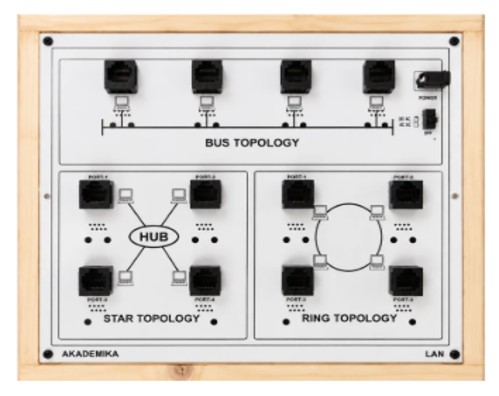
A complete networking education platform designed to demonstrate LAN topologies, communication protocols, and real-time network behavior. It supports Star, Bus, and Ring architectures with protocol simulation, data encryption, error analysis, and graphical packet visualization — enabling students to learn hands-on Ethernet and wireless communication fundamentals.
1) A hardware-plus-software LAN trainer covering star, bus and ring topologies with a full protocol suite, live protocol analysis and error-generation study.
2) A Local Area Network (LAN) Trainer Kit is an educational tool designed to teach networking concepts, cabling, topologies, and troubleshooting.
2) A Local Area Network (LAN) Trainer Kit is an educational tool designed to teach networking concepts, cabling, topologies, and troubleshooting.
HARDWARE
A) Topology
i) Star
ii) Bus
iii) Ring
1) Server : 1 Server
2) Nodes : 3 Nodes
3) Data Rate : 10/100 Mbps
4) Interconnection : RJ45 connection cable to connect hardware to computer LAN card
5) SOFTWARE : LAN
B) Topology selection
i) Star
ii) Bus
iii) Ring
C) Protocols selection
i) Stop and Wait
ii) Go back to n
iii) Selective repeat
iv) Sliding window
v) Token Ring
vi) Token Bus
vii) CSMA / CD
viii) CSMA / CA
SOFTWARE : Protocol Analyser
1) PROTOCOL ANALYSIS
Indication of packet serial number, file name, file size, file number, receiver name, workgroup, receiver IP address, current packet, total packets, packet length, delay, protocol, topology, receiver MAC address, port number, packet send time, acknowledgment receive time, inter packet delay, data rate (MBPS), number of resend packets, acknowledgment value
2) NETWORK ANALYSIS
Packet Size : 128, 256, 512, 1024, 2048, 4096, 8192, 16384Inter packet delay : 1000, 2000, 3000, 4000, 5000msError generation : Bad packet, acknowledgment lost and auto error generation. Encryption and decryption of data
3) NETWORK DETAILS
Indication of computer name, IP address, Port number, status of network, MAC address and operating system on computer.
4) GRAPHICAL REPRESENTATION
Graphic representation of Data on software screen with differentiation of packet to be transmitted, packet being transmitted, packet transmitted with acknowledgment, packet with acknowledgment lost error, packet with bad packet error and packet which is discarded or resend.
5) MEASUREMENT AND PLOTTING
i) Error rate calculation, Throughput calculation
Indication of packet serial number, file name, file size, file number, receiver name, work group, receiver IP address, total packets, packet length, time out, protocol, topology, receiver MAC address, port number, file send start time, file sent completion time, transmission time, data rate (MBPS), error.10/100 Mbps RJ-45 N way portsComplies with IEEE802.3 and IEEE802.3x standardsUp to 100 Mbps data transfer rates (full duplex)
A) Topology
i) Star
ii) Bus
iii) Ring
1) Server : 1 Server
2) Nodes : 3 Nodes
3) Data Rate : 10/100 Mbps
4) Interconnection : RJ45 connection cable to connect hardware to computer LAN card
5) SOFTWARE : LAN
B) Topology selection
i) Star
ii) Bus
iii) Ring
C) Protocols selection
i) Stop and Wait
ii) Go back to n
iii) Selective repeat
iv) Sliding window
v) Token Ring
vi) Token Bus
vii) CSMA / CD
viii) CSMA / CA
SOFTWARE : Protocol Analyser
1) PROTOCOL ANALYSIS
Indication of packet serial number, file name, file size, file number, receiver name, workgroup, receiver IP address, current packet, total packets, packet length, delay, protocol, topology, receiver MAC address, port number, packet send time, acknowledgment receive time, inter packet delay, data rate (MBPS), number of resend packets, acknowledgment value
2) NETWORK ANALYSIS
Packet Size : 128, 256, 512, 1024, 2048, 4096, 8192, 16384Inter packet delay : 1000, 2000, 3000, 4000, 5000msError generation : Bad packet, acknowledgment lost and auto error generation. Encryption and decryption of data
3) NETWORK DETAILS
Indication of computer name, IP address, Port number, status of network, MAC address and operating system on computer.
4) GRAPHICAL REPRESENTATION
Graphic representation of Data on software screen with differentiation of packet to be transmitted, packet being transmitted, packet transmitted with acknowledgment, packet with acknowledgment lost error, packet with bad packet error and packet which is discarded or resend.
5) MEASUREMENT AND PLOTTING
i) Error rate calculation, Throughput calculation
Indication of packet serial number, file name, file size, file number, receiver name, work group, receiver IP address, total packets, packet length, time out, protocol, topology, receiver MAC address, port number, file send start time, file sent completion time, transmission time, data rate (MBPS), error.10/100 Mbps RJ-45 N way portsComplies with IEEE802.3 and IEEE802.3x standardsUp to 100 Mbps data transfer rates (full duplex)
1) Study of network topologies, data encryption and decryption Implementation and study go back to n protocol. token ring and token bus protocol CSMA / CA protocol Measure of throughput and the effect of bit errors on various protocols,Ethernet LAN and Wireless LAN, sliding window protocol, CSMA / CD protocol Socket programming.
2) Implementation and study of stop and wait protocol, selective repeat protocol.
2) Implementation and study of stop and wait protocol, selective repeat protocol.
With 35 years of legacy in Technical Education, Akademika extends its expertise to Defence and Skill development, building Innovative, Reliable Training Systems for the next generation of Learners.
Partner with Akademika
Join leading institutions that trust our engineering to Advance Learning and Research.