
Technology Labs
PL-STM - STM32 Series Cortex-M7 Based Embeded Development Kit
About Product
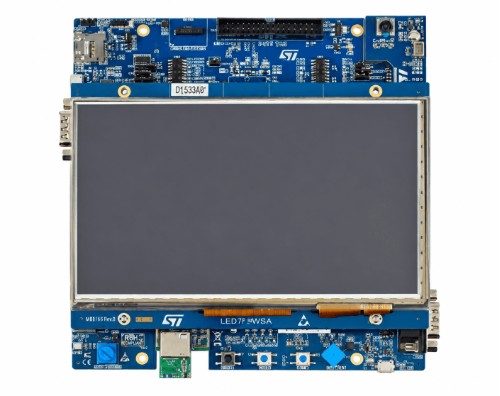
The PL-STM STM32 Series Cortex-M7 Based Embedded Development Kit is an advanced training platform designed for embedded systems development and experimentation. Powered by the STM32H7 microcontroller, it features a 7-inch TFT touchscreen, multiple communication interfaces, and peripheral connectivity. The kit supports STM32CubeIDE, STM32CubeMX, and TouchGFX for hands-on learning in embedded programming, hardware interfacing, and graphical application development.
1 ) The STM32H7B3I-EVAL Evaluation board is a complete demonstration and development platform for the Arm® Cortex®-M7-based. The STM32H7B3I-EVAL Evaluation board provides access to all the STM32 peripherals for user applications and includes an embedded STLINK-V3E debugger/programmer, Power Supply. STM32H7B3I-EVAL platform for the STM32H7B3 family (Cortex-M7).
2 ) Use cases: High-performance MCU evaluation, graphics/HMI, high-speed interfaces (USB HS), and advanced lab development.The full range of the STM32H7B3I-EVAL hardware features helps to develop applications and evaluate all the peripherals, such as USB OTG HS and FS, CAN FD, USART, ADC and DAC, digital microphones, SRAM, SDRAM, NOR flash memory, Octo‑SPI flash memory with OTFDEC, microSD™ 3.0 card, 7" 800x480 WVGA TFT color RGB LCD with capacitive touch panel (I2C), and DCMI camera.
2 ) Use cases: High-performance MCU evaluation, graphics/HMI, high-speed interfaces (USB HS), and advanced lab development.The full range of the STM32H7B3I-EVAL hardware features helps to develop applications and evaluate all the peripherals, such as USB OTG HS and FS, CAN FD, USART, ADC and DAC, digital microphones, SRAM, SDRAM, NOR flash memory, Octo‑SPI flash memory with OTFDEC, microSD™ 3.0 card, 7" 800x480 WVGA TFT color RGB LCD with capacitive touch panel (I2C), and DCMI camera.
1) STM32H7B3LIH6Q Arm® Cortex® microcontroller with 2 Mbytes of flash memory and 1.4 Mbyte of RAM in TFBGA225 package
2) 7" 800x480 WVGA TFT LCD color module with RGB parallel interface and capacitive touch panel with I2C interface
3) 1/4" color CMOS QSXGA (5 Mpixels) camera module with DCMI and I2C interface
4) USB OTG HS and USB OTG FS
5) On-board current measurement
6) I2S/SAI audio codec
7) 512-Mbit Octo‑SPI NOR flash, 8‑Mx32bit SDRAM, 1‑Mx16bit SRAM, and 8‑Mx16bit NOR flash
8) Four color user LEDs
9) Reset, wake up, and tamper push-buttons
10) 4-direction joystick with a selection button
11) Potentiometer
12) Coin-battery cell holder for power backup
13) Power-metering and temperature-monitoring demonstration with 2 dual-channel, sigma-delta modulators
14) Wi‑Fi® module compliant with 802.11 b/g/n
15) Board connectors
Two USB Micro-AB
Two microSD™ cards
16) Octo‑SPI NOR flash module connector
17) Stereo line out headset jack including analog microphone input
18) Stereo line in headset jack
19) Two DB9 for external RS-232 port and CAN FD
20) JTAG and ETM trace debugger
21) Connectors for ADC and DAC
22) I/O expansion connectors
23) DFSDM microphone daughterboard expansion connector
24) Motor-control interface expansion connector
25) I2C expansion connector
26) Flexible power-supply options: ST-LINK USB VBUS, USB connector, or external sources
27) On-board STLINK-V3E debugger/programmer with USB re-enumeration capability: mass storage, Virtual COM port, and debug port
28) Comprehensive free software libraries and examples available with the STM32Cube MCU Package
29) Support of a wide choice of Integrated Development Environments (IDEs) Embedded STM32CubeMX, STM32CubeIDE, STM32CubeProgrammer,
(NOTE : IDE Refer or General )
30) Support to Windows® 10 or 11, Linux® 64-bit
1) Integrated Development Environment for STM32
STM32CubeIDE is a multi-OS, C/C++ integrated development environment for STM32 code development. It helps developers minimize the time and cost required to bring an STM32‑based product to market.STM32CubeIDE is an environment for editing, compiling, and debugging. Users often use it with other tools from the STM32Cube ecosystem such as the STM32CubeMX graphical configuration tool. It is also compatible with several vertical solution tools, including TouchGFXDesigner, STM32Cube AI Studio, and motor control workbench.
2) STM32CubeMX STM32Cube initialization code generator
STM32CubeMX which includes the STM32CubeMX and STM32CubeMX2, is a graphical tool that simplifies the configuration of STM32 products, and generates the corresponding initialization code through a guided step-by-step process.
3) STM32CubeProgrammer software for all STM32
STM32CubeProgrammer (STM32CubeProg) is an all-in-one multi-OS software tool for programming STM32 products.
4) X-CUBE-TOUCHGFXSTM32CubeIDE
TouchGFX is an advanced, free-of-charge GUI optimized for STM32 microcontrollers. Taking advantage of the STM32 graphical hardware acceleration, architecture, and ecosystem, TouchGFX accelerates the HMI-of-Things revolution through the creation of stunning smartphone user interfaces on embedded devices ranging from simple low-color UI applications up to high-resolution and high-color UI applications.
2) 7" 800x480 WVGA TFT LCD color module with RGB parallel interface and capacitive touch panel with I2C interface
3) 1/4" color CMOS QSXGA (5 Mpixels) camera module with DCMI and I2C interface
4) USB OTG HS and USB OTG FS
5) On-board current measurement
6) I2S/SAI audio codec
7) 512-Mbit Octo‑SPI NOR flash, 8‑Mx32bit SDRAM, 1‑Mx16bit SRAM, and 8‑Mx16bit NOR flash
8) Four color user LEDs
9) Reset, wake up, and tamper push-buttons
10) 4-direction joystick with a selection button
11) Potentiometer
12) Coin-battery cell holder for power backup
13) Power-metering and temperature-monitoring demonstration with 2 dual-channel, sigma-delta modulators
14) Wi‑Fi® module compliant with 802.11 b/g/n
15) Board connectors
Two USB Micro-AB
Two microSD™ cards
16) Octo‑SPI NOR flash module connector
17) Stereo line out headset jack including analog microphone input
18) Stereo line in headset jack
19) Two DB9 for external RS-232 port and CAN FD
20) JTAG and ETM trace debugger
21) Connectors for ADC and DAC
22) I/O expansion connectors
23) DFSDM microphone daughterboard expansion connector
24) Motor-control interface expansion connector
25) I2C expansion connector
26) Flexible power-supply options: ST-LINK USB VBUS, USB connector, or external sources
27) On-board STLINK-V3E debugger/programmer with USB re-enumeration capability: mass storage, Virtual COM port, and debug port
28) Comprehensive free software libraries and examples available with the STM32Cube MCU Package
29) Support of a wide choice of Integrated Development Environments (IDEs) Embedded STM32CubeMX, STM32CubeIDE, STM32CubeProgrammer,
(NOTE : IDE Refer or General )
30) Support to Windows® 10 or 11, Linux® 64-bit
1) Integrated Development Environment for STM32
STM32CubeIDE is a multi-OS, C/C++ integrated development environment for STM32 code development. It helps developers minimize the time and cost required to bring an STM32‑based product to market.STM32CubeIDE is an environment for editing, compiling, and debugging. Users often use it with other tools from the STM32Cube ecosystem such as the STM32CubeMX graphical configuration tool. It is also compatible with several vertical solution tools, including TouchGFXDesigner, STM32Cube AI Studio, and motor control workbench.
2) STM32CubeMX STM32Cube initialization code generator
STM32CubeMX which includes the STM32CubeMX and STM32CubeMX2, is a graphical tool that simplifies the configuration of STM32 products, and generates the corresponding initialization code through a guided step-by-step process.
3) STM32CubeProgrammer software for all STM32
STM32CubeProgrammer (STM32CubeProg) is an all-in-one multi-OS software tool for programming STM32 products.
4) X-CUBE-TOUCHGFXSTM32CubeIDE
TouchGFX is an advanced, free-of-charge GUI optimized for STM32 microcontrollers. Taking advantage of the STM32 graphical hardware acceleration, architecture, and ecosystem, TouchGFX accelerates the HMI-of-Things revolution through the creation of stunning smartphone user interfaces on embedded devices ranging from simple low-color UI applications up to high-resolution and high-color UI applications.
1) Input switch and Output LED interface.
2) Acquire ADC data wrt POT
3) Internal DAC waveform generation.
4) UART data transmission.
5) Interface TFT
6) RTC interface
7) Test Sample code for I2C
8) Test Sample code for SPI
9) Test Sample code for CAN
10)Camera real time data Display on TFT
11) The Development Platform provides you with the flexibility and capabilities to build and develop your own applications efficiently.
2) Acquire ADC data wrt POT
3) Internal DAC waveform generation.
4) UART data transmission.
5) Interface TFT
6) RTC interface
7) Test Sample code for I2C
8) Test Sample code for SPI
9) Test Sample code for CAN
10)Camera real time data Display on TFT
11) The Development Platform provides you with the flexibility and capabilities to build and develop your own applications efficiently.
With 35 years of legacy in Technical Education, Akademika extends its expertise to Defence and Skill development, building Innovative, Reliable Training Systems for the next generation of Learners.
Partner with Akademika
Join leading institutions that trust our engineering to Advance Learning and Research.