
Technology Labs
VL-KRIA : Zynq UltraScale+ MPSoC Based Vision AI Starter Kit
About Product
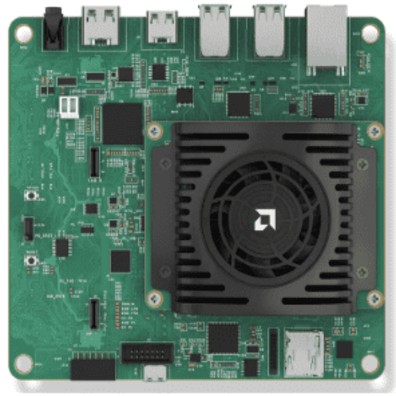
The Kria Vision AI Starter Kit is an advanced development platform powered by Zynq UltraScale+ MPSoC, designed for AI, computer vision, and embedded applications. It supports real-time image processing, object detection, machine learning, and hardware acceleration using FPGA technology. The kit enables hands-on experimentation in AI development, robotics, and edge computing.
1) The AMD Kria™ portfolio combines leadership AMD hardware and software for physical AI and other advanced embedded applications at the edge. The portfolio includes production-deployable SOMs and comprehensive evaluation kits
2) The AMD Kria™ AI SOM provides the intelligent compute foundation for the next frontier of physical AI, combining CPU, GPU, NPU, and unified memory on a compact COM-HPC module optimized for robotics and autonomous machines. Available as a production-ready SOM or partner-validated SOM with carrier card, it enables scalable deployment and rapid system development. Built on the Kria AI SOM, the AMD Kria™ AI Robotics Developer Platform extends this foundation into the industry's first open, fully integrated platform for autonomous robotics, empowering developers to prototype, customize, and deploy real-time AI systems with accelerated
3) Vison Ready
4) Multi-camera Support: Up to 8 interfaces
5) 3 MIPI sensor interfaces, USB cameras
6) Built-in ISP component (OnSemi)
7) HDMI™, DisplayPort™ outputs
8) Flexible Connectivity
9) 1 Gb Ethernet
10) USB 3.0 / 2.0
11) Expandable
12) Extend to any sensor or interface
13) Access Pmod ecosystem
14) Accessible
15) Low cost, enabling design exploration
16) Available from AMD and distributors
2) The AMD Kria™ AI SOM provides the intelligent compute foundation for the next frontier of physical AI, combining CPU, GPU, NPU, and unified memory on a compact COM-HPC module optimized for robotics and autonomous machines. Available as a production-ready SOM or partner-validated SOM with carrier card, it enables scalable deployment and rapid system development. Built on the Kria AI SOM, the AMD Kria™ AI Robotics Developer Platform extends this foundation into the industry's first open, fully integrated platform for autonomous robotics, empowering developers to prototype, customize, and deploy real-time AI systems with accelerated
3) Vison Ready
4) Multi-camera Support: Up to 8 interfaces
5) 3 MIPI sensor interfaces, USB cameras
6) Built-in ISP component (OnSemi)
7) HDMI™, DisplayPort™ outputs
8) Flexible Connectivity
9) 1 Gb Ethernet
10) USB 3.0 / 2.0
11) Expandable
12) Extend to any sensor or interface
13) Access Pmod ecosystem
14) Accessible
15) Low cost, enabling design exploration
16) Available from AMD and distributors
1) Device : Zynq™ UltraScale+™ MPSoC
2) Form Factor : SOM + Carrier Card + Thermal Solution
3) Starter Kit Dimensions : 119 mm x 140 mm x 36 mm
4) Thermal Cooling Solution : Active (Fan + Heatsink)
5) System Logic Cells : 256KUltra
6) Block RAM Blocks : 144
7) RAM Blocks : 64
8) DSP Slices : 1.2K
9) Ethernet Interface : One 10/100/1000 Mb/s
10) DDR Memory : 4 GB (4 x 512 Mb x 16 bit) [non-ECC]
11) Primary Boot Memory : 512 Mb QSPI
12) Secondary Boot Memory : SDHC card
13) Device Security : Zynq UltraScale+ MPSoC hardware root of trust (RoT) in support of secure boot. Infineon TPM2.0 in support of measured boot.
14) Image Sensor Processor : OnSemi AP1302 ISP
15) IAS MIPI Sensor Interfaces : x2 (supports auto-focus)
16) Raspberry Pi Camera Interface : x1
17) Pmod 12-pin Interface : x1
18) USB® 3.0/2.0 Interface : x4
19) DisplayPort™ 1.2a : x1
20) HDMI™ 1.4 : x1
21) 12V AC/DC wall mount adapter for the Kria™ KV260 Vision AI Starter Kit.
SOFTWARE
1) Ubuntu 22.04 (KV260 Image) : Runs on KV260; Purpose: OS with Vitis AI runtime pre-installed.
2) Python 3 + OpenCV : Runs on KV260; Purpose: AI experiments and image/data processing.
3) VS Code + Remote SSH : Runs on Student PC; Purpose: Remote development environment for the KV260.
4) Vivado WebPACK Edition : Runs on Student PC; Purpose: FPGA synthesis, implementation, and bitstream generation.
5) Vitis AI Docker (v3.5) : Runs on Student PC; Purpose: Model quantization and compilation for DPU deployment.
6) Google Colab : Runs on Browser; Purpose: All Stage 1 and Bridge notebook experiments.
7) LabelImg : Runs on Student PC; Purpose: Dataset annotation for custom image experiments.
2) Form Factor : SOM + Carrier Card + Thermal Solution
3) Starter Kit Dimensions : 119 mm x 140 mm x 36 mm
4) Thermal Cooling Solution : Active (Fan + Heatsink)
5) System Logic Cells : 256KUltra
6) Block RAM Blocks : 144
7) RAM Blocks : 64
8) DSP Slices : 1.2K
9) Ethernet Interface : One 10/100/1000 Mb/s
10) DDR Memory : 4 GB (4 x 512 Mb x 16 bit) [non-ECC]
11) Primary Boot Memory : 512 Mb QSPI
12) Secondary Boot Memory : SDHC card
13) Device Security : Zynq UltraScale+ MPSoC hardware root of trust (RoT) in support of secure boot. Infineon TPM2.0 in support of measured boot.
14) Image Sensor Processor : OnSemi AP1302 ISP
15) IAS MIPI Sensor Interfaces : x2 (supports auto-focus)
16) Raspberry Pi Camera Interface : x1
17) Pmod 12-pin Interface : x1
18) USB® 3.0/2.0 Interface : x4
19) DisplayPort™ 1.2a : x1
20) HDMI™ 1.4 : x1
21) 12V AC/DC wall mount adapter for the Kria™ KV260 Vision AI Starter Kit.
SOFTWARE
1) Ubuntu 22.04 (KV260 Image) : Runs on KV260; Purpose: OS with Vitis AI runtime pre-installed.
2) Python 3 + OpenCV : Runs on KV260; Purpose: AI experiments and image/data processing.
3) VS Code + Remote SSH : Runs on Student PC; Purpose: Remote development environment for the KV260.
4) Vivado WebPACK Edition : Runs on Student PC; Purpose: FPGA synthesis, implementation, and bitstream generation.
5) Vitis AI Docker (v3.5) : Runs on Student PC; Purpose: Model quantization and compilation for DPU deployment.
6) Google Colab : Runs on Browser; Purpose: All Stage 1 and Bridge notebook experiments.
7) LabelImg : Runs on Student PC; Purpose: Dataset annotation for custom image experiments.
GOOGLE COLAB - MASTER NOTEBOOK LIST
REGRESSION
CLASSIFICATION
CLUSTERING
DIMENSIONALITY
REDUCTION
DEEP LEARNING
CLASSICAL AI (OPTIONAL)
Hardware Colab BridgeStage 2 experiments run directly on the AMD Kria KV260 board. They are delivered as step-by-step hardware lab sheets, not Colab notebooks. Each experiment references the corresponding Stage 1 concept so students see the direct connection between software and hardware.
Description & Stage 1 Link
H1. Platform Setup
H1.1
i) KV260 orientation & SSH access
ii) DPU overlay, PS/PL architecture, verify Python and OpenCV are available.
H1.2
i) Camera setup
ii) USB camera pipeline using OpenCV: capture, display, and save frames. Prerequisite for all vision-based experiments.
H2. Beginner AI Deployment
H2.1
i) Image pre-processing with OpenCV
Gaussian blur, Canny edge detection, and Sobel filters applied to live camera frames. Teaches how images are processed as arrays of numbers. Links to Stage 1 CNN concepts (notebook 5.2).
H2.2
i) Live image classification on DPU (MobileNetV2)
ii) Run a pre-compiled MobileNetV2 model via the VART Python API. Live camera inference on the DPU in real time. Students learn how VART, XIR, and DPU subgraphs work. Direct link to the Bridge B1–B4 pipeline.
H2.3
i) Static image inference (MobileNetV2)
ii) Run MobileNetV2 inference on a single static image. Print top predictions with confidence scores. Understand the full VART input/output pipeline without camera complexity.
H3. Intermediate - Benchmarking & Systems
H3.1
i) CPU vs DPU inference benchmark
ii) Same model, compare latency and throughput on ARM Cortex-A53 vs. the on-chip DPU. Establishes why hardware acceleration matters.
H3.2
i) Power consumption analysis
ii) On-chip SYSMON power analysis via Linux sysfs. Measure idle vs. CPU vs. DPU inference power draw. Tabulate and compare performance per watt.
H3.3
i) YOLO multi-object detection
ii) Use a pre-compiled YOLOv5/v8 model from the AMD Vitis AI Model Zoo. Real-time detection via USB camera.
H3.4
i) PMOD HYGRO temperature and humidity acquisition over I2C
ii) Read temperature and humidity data from the PMOD HYGRO sensor. Log and plot data on the ARM processor. Foundation for H5 applications.
H3.5
i) PMOD ACL2 vibration anomaly detection on ARM
Read accelerometer data from PMOD ACL2. Apply a threshold classifier to detect abnormal vibration patterns. Predictive maintenance use case. Links to Stage 1 notebook 5.3 (RNN/LSTM).
H4. AI-Accelerated Hardware (Verilog + DPU)
H4.1
i) LED blinker in Verilog
First Vivado design flow end-to-end: write Verilog, synthesize, generate a bitstream, load it onto the board. Proves the PL fabric works while the DPU overlay runs simultaneously on the PS.
H4.2
i) AXI-Lite GPIO counter and PS–PL communication
ii) A Verilog counter exposed via AXI-Lite GPIO. An ARM Python script reads the counter value over the AXI bus, proving PS and PL can communicate.
H4.3
i) Hardware confidence thresholding
ii) Camera captures a frame and the DPU produces a classification confidence score. Python writes the score to a Verilog comparator over AXI-GPIO; the comparator checks it against a threshold register and drives an LED — confident predictions light it, uncertain ones don't. Completes the sensor → AI → hardware-decision loop in a single bitstream alongside the DPU.
H4.4
i) Grayscale conversion IP
ii) Pixel-level Verilog IP packaged as AXI-Stream. Live camera frames pass through the Verilog grayscale IP and output to HDMI.
H4.5
i) DPU inference result drives PWM via Verilog IP
ii) The DPU confidence score is sent to a Verilog PWM IP via AXI. The PWM duty cycle changes based on the AI output — closing the sensor-to-AI-to-actuator loop.
REGRESSION
CLASSIFICATION
CLUSTERING
DIMENSIONALITY
REDUCTION
DEEP LEARNING
CLASSICAL AI (OPTIONAL)
Hardware Colab BridgeStage 2 experiments run directly on the AMD Kria KV260 board. They are delivered as step-by-step hardware lab sheets, not Colab notebooks. Each experiment references the corresponding Stage 1 concept so students see the direct connection between software and hardware.
Description & Stage 1 Link
H1. Platform Setup
H1.1
i) KV260 orientation & SSH access
ii) DPU overlay, PS/PL architecture, verify Python and OpenCV are available.
H1.2
i) Camera setup
ii) USB camera pipeline using OpenCV: capture, display, and save frames. Prerequisite for all vision-based experiments.
H2. Beginner AI Deployment
H2.1
i) Image pre-processing with OpenCV
Gaussian blur, Canny edge detection, and Sobel filters applied to live camera frames. Teaches how images are processed as arrays of numbers. Links to Stage 1 CNN concepts (notebook 5.2).
H2.2
i) Live image classification on DPU (MobileNetV2)
ii) Run a pre-compiled MobileNetV2 model via the VART Python API. Live camera inference on the DPU in real time. Students learn how VART, XIR, and DPU subgraphs work. Direct link to the Bridge B1–B4 pipeline.
H2.3
i) Static image inference (MobileNetV2)
ii) Run MobileNetV2 inference on a single static image. Print top predictions with confidence scores. Understand the full VART input/output pipeline without camera complexity.
H3. Intermediate - Benchmarking & Systems
H3.1
i) CPU vs DPU inference benchmark
ii) Same model, compare latency and throughput on ARM Cortex-A53 vs. the on-chip DPU. Establishes why hardware acceleration matters.
H3.2
i) Power consumption analysis
ii) On-chip SYSMON power analysis via Linux sysfs. Measure idle vs. CPU vs. DPU inference power draw. Tabulate and compare performance per watt.
H3.3
i) YOLO multi-object detection
ii) Use a pre-compiled YOLOv5/v8 model from the AMD Vitis AI Model Zoo. Real-time detection via USB camera.
H3.4
i) PMOD HYGRO temperature and humidity acquisition over I2C
ii) Read temperature and humidity data from the PMOD HYGRO sensor. Log and plot data on the ARM processor. Foundation for H5 applications.
H3.5
i) PMOD ACL2 vibration anomaly detection on ARM
Read accelerometer data from PMOD ACL2. Apply a threshold classifier to detect abnormal vibration patterns. Predictive maintenance use case. Links to Stage 1 notebook 5.3 (RNN/LSTM).
H4. AI-Accelerated Hardware (Verilog + DPU)
H4.1
i) LED blinker in Verilog
First Vivado design flow end-to-end: write Verilog, synthesize, generate a bitstream, load it onto the board. Proves the PL fabric works while the DPU overlay runs simultaneously on the PS.
H4.2
i) AXI-Lite GPIO counter and PS–PL communication
ii) A Verilog counter exposed via AXI-Lite GPIO. An ARM Python script reads the counter value over the AXI bus, proving PS and PL can communicate.
H4.3
i) Hardware confidence thresholding
ii) Camera captures a frame and the DPU produces a classification confidence score. Python writes the score to a Verilog comparator over AXI-GPIO; the comparator checks it against a threshold register and drives an LED — confident predictions light it, uncertain ones don't. Completes the sensor → AI → hardware-decision loop in a single bitstream alongside the DPU.
H4.4
i) Grayscale conversion IP
ii) Pixel-level Verilog IP packaged as AXI-Stream. Live camera frames pass through the Verilog grayscale IP and output to HDMI.
H4.5
i) DPU inference result drives PWM via Verilog IP
ii) The DPU confidence score is sent to a Verilog PWM IP via AXI. The PWM duty cycle changes based on the AI output — closing the sensor-to-AI-to-actuator loop.
With 35 years of legacy in Technical Education, Akademika extends its expertise to Defence and Skill development, building Innovative, Reliable Training Systems for the next generation of Learners.
Partner with Akademika
Join leading institutions that trust our engineering to Advance Learning and Research.