
Technology Labs
WB-NST: Computer Networks Workbench
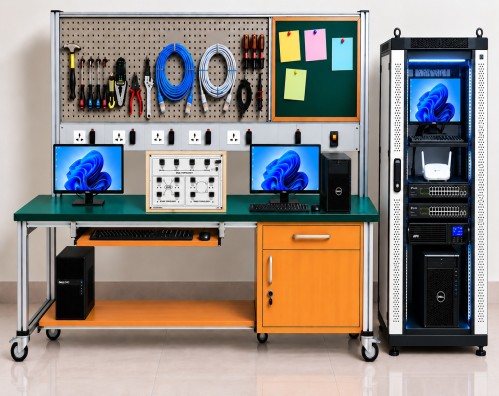
About Product
The Computer Networks Workbench is a comprehensive training platform designed for hands-on learning of computer networking, configuration, and troubleshooting. It includes a server, routers, managed switches, wireless access point, LAN trainer, and networking tools for practical experiments. The workbench supports network topology studies, routing protocols, VLAN configuration, packet analysis, and network security concepts.
1) Smooth surface with antistatic pad
2) Movable caster wheel
3) Circuit breakers for Protection
4) Power supply sockets for 5 and 15 Amps
5) Required network equipement
6) Compute Server for DHCP, FTP and DNS
7) Router & Layer 2 Switch
8) Wireless Access Point
9) LAN Trainer
10) LAN Tool Kit
11) STAR, BUS and RING Topology
12) Network Protection and Troubleshooting
13) CLI and Web Managed Configuration of a Switch & Router
14) Configuring a WAP and Wireless LAN
15) VLAN Set-up
16) Protocols selection
i) Stop and Wait
ii) Go back to n
iii) Selective repeat
iv) Sliding window
v) Token Ring
vi) Token Bus
vii) CSMA / CD
viii) CSMA / CA
MECHANICAL AND ELECTRICAL SPECIFICATIONS
i) Dimensions : 1500mm x 750mm x 750mm
ii) 25mm Table Top
iii) 30mm × 30mm aluminium extrusion
iv) Lockable castor wheels
v) Cupboard with shelf : 450mm x 450mm x 450mm
vi) Drawer : 450mm x 450mm x 150 mm
vii) Computer Keyboard drawer under the table 50mm x 380mm
viii) Electric Panel height from table top 100mm
ix) 5 Sockets with circuit breaker
x) Back panel 900mm above the table top
xi) Perforated sheet panel for hanging tools 600mm
xii) Baseplate for Computer 1000mm x 375mm
A) Compute Server - 1 No
i) AMD EPYC 4004 / AMD B650 chipset.
ii) 16 GB DDR4 ECC RAM.
iii) 2 × 1 TB SATA HDD with RAID (0,1,5,10).
iv) Windows Server with Monitor, Keyboard and Mouse.
v) Monitor, Keyboard, Mouse supplied with the Server.
B) Router – 1 No
i) Aggregate throughput : 35 Mbps or better.
ii) 10/100/1000 WAN/LAN ports.
iii) RJ-45 based ports.
iv) 4 GB DDR3 ECC DRAM.
v) 8 GB Flash Memory.
vi) Supports IPv4/IPv6, Static Routing, RIP, OSPF, EIGRP and BGP protocols.
C) Client Workstation – 3 Nos
D) Managed Layers 2 SWITCH – 1 No.
i) 800 MHz processor.
ii) 512 MB SDRAM, 256 MB Flash memory.
iii) IEEE 802.1Q VLAN support.
iv) Supports up to 256 VLANs.
v) IEEE 802.1X access control.
vi) Spanning Tree Protocol (STP) support.
vii) Address Resolution Protocol (ARP).
E) Wireless Access Point – 1 No
i) Dual Band 5 GHz 802.11ac and 2.4 GHz 802.11n.
ii) 300 Mbps maximum data rate.
iii) 10/100/1000BASE-T Ethernet interface.
iv) 4 LAN ports and 1 WAN port.
F) Lan Trainer Kit
i) Hardware Topology :
Star, Bus, Ring
ii) Nodes : 4 Nodes
iii) Data Rate : 10/100 Mbps
iv) Interconnection : RJ45 connection cable to connect hardware to computer LAN card
v) Lan Training Software :
Star, Bus, Ring
Protocols selection
i) Stop and Wait
ii) Go Back to n
iii) Selective Repeat
iv) Sliding Window
v) Token Ring
vi) Token Bus
vii) CSMA/CD
viii) CSMA/CA
ix) Packet Size : 128, 256, 512, 1024, 2048, 4096, 8192, 16384
x) Inter packet delay : 1000, 2000, 3000, 4000, 5000ms
xi) Error generation : Bad packet, acknowledgment lost and auto error generation
Encryption and decryption of data
xii) Network details : Indication of computer name, IP address, Port number, status of network, MAC address and operating system on computer.
xiii) Graphical representation : Graphic representation of Data on software screen with differentiation of packet to be transmitted, packet being transmitted, packet transmitted with acknowledgment, packet with acknowledgment lost error, packet with bad packet error and packet which is discarded or resend.
xiv) Measurement and plotting : Error rate calculation, Throughput calculation
xv) Protocol analysis : Indication of packet serial number, file name, file size, file number, receiver name, workgroup, receiver IP address, current packet, total packets, packet length, delay, protocol, topology, receiver MAC address, port number, packet send time, acknowledgment receive time, inter packet delay, data rate (MBPS), number of resend packets, acknowledgment value
xvi) Network analysis : Indication of packet serial number, file name, file size, file number, receiver name, work group, receiver IP address, total packets, packet length, time out, protocol, topology, receiver MAC address, port number, file send start time, file sent completion time, transmission time, data rate (MBPS), error.
G) Lan Tool Kit - 1 Set
i) LAN Cable Tester : 2 Nos
ii) RJ-45 Connectors : 200 Nos
iii) Crimping Tool : 2 Nos
iv) Cat5 Cable : 100 mtrs.
H) Mechanical Tool Kit
i) Tool Box / Tool Storage Case
ii) Socket Set with Ratchet Handle
iii) Socket Bits
iv) Extension Rods
v) Ratchet Wrench
vi) Hex Key Set (Allen Keys)
vii) Combination Spanner Set
viii) Adjustable Wrench Set
ix) Pipe Wrench
x) Chain Pipe Wrench
xi) Combination Pliers
xii) Long Nose Pliers
xiii) Diagonalxiv) Cutting Pliers
xv) Water Pump Pliers
xvi) Locking Pliers
xvii) Hacksaw Frame with Blade
xviii) Tube Cutter
xix) Pipe Cutter
xx) Utility Knife / Safety Knife
xxi) Claw Hammer
xxii) Rubber Mallet
xxiii) Flat Files
xxiv) Round Files
xxv) Metal Punch Set
xxvi) Chisel Set
xxvii) Screwdriver Set
xxviii) Flat Head Screwdriver
xxix) Phillips Head Screwdriver
xxx) Tape Measure
xxxi) Spirit Level
xxxii) Wire Brush
xxxiii) Tin Snips / Metal Cutting Shears
xxxiv) PVC Pipe Cutter
xxxv) Open End Spanner Set
xxxvi) Ring Spanner Set
xxxvii) Adjustable Pipe Wrench
xxxviii) Precision Bit Set
xxxix) Measuring Scale / Steel Ruler
I) Network Tool Kit
i) RJ45/8P8C crimping die
ii) RG58/59/62/6 crimping die
iii) F-type crimping die
iv) Fiber-optic connector die
v) Krone impact terminal tool
vi) Wire stripping tools
vii) Mini LAN cable tester
viii) Crimping tool
iv) Soldering iron
x) Digital multimeter
*Image shown is for reference only and does not represent the actual workbench configuration or design.
The Objective of the workbenches is to teach the following Curriculum
1) Types of Networks: Network Media–UPT Cables and wiring scheme, Topologies- Star, Bus & Ring Topology,
2) Server: Client and Server Roles, Peer to Peer Network, Install and Configure Windows Server, Install and configure Active Directory, Implementing AD Services, Configuring a Server as a Web and FTP Server, Mail Box , DHCP and DNS Services
3) Network Devices: Command line Interface & Web Managed Configuration of Switch, Configuring a WAP & Wireless LAN, Out of band and In band Management.
4) Network Switching and Routing: Study of OSI Layer (Physical, Data Link, Network & Transport Layer), Address Routing Protocol (ARP), IP Addressing technique (IP4/IP6) and Subnetting, Installation and Configuration of TCP/IP Protocol Utilities: PING, IPCONFIG, HOSTNAME, ROUTE, TRACERT etc. Packet Switching, Setup and configure a Virtual LAN , Spanning Tree Protocol, Command Line Interface and IP Routing, Network Protocols, Network Simulation Tools.
5) Protocols:
i) Stop and Wait
ii) Go back to n
iii) Selective repeat
iv) Sliding window
v) Token Ring
vi) Token Bus
vii) CSMA / CD
viii) CSMA / CA
ix) Real Time Protocol Analysis-TCP/IP & UDP
With 35 years of legacy in Technical Education, Akademika extends its expertise to Defence and Skill development, building Innovative, Reliable Training Systems for the next generation of Learners.
Partner with Akademika
Join leading institutions that trust our engineering to Advance Learning and Research.